
How monday.com Enterprise turns permissions from all-or-nothing into role-by-role control
When a project brings together internal teams, contractors, consultants and vendors, “who can see what” stops being a minor setting and becomes a real operational risk. Many project management tools treat access like a switch: a person is either fully inside, or has no access at all. That gap is exactly where monday.com’s Enterprise plan is built to close it.
The Problem With All-Or-Nothing Access
On more basic plans, board-level permissions are broad: access is typically set to “everyone” or “specific people,” with little room in between. External guests get a single access tier with fairly broad visibility once invited, and anyone with edit access can generally change a status, including marking something “approved” that shouldn’t be.
The result is a familiar trade-off. Teams either over-restrict access, which slows down the contractors, consultants and vendors they depend on, or they over-share, exposing sensitive commercial and financial data to people who don’t need it.
What Changes With Enterprise
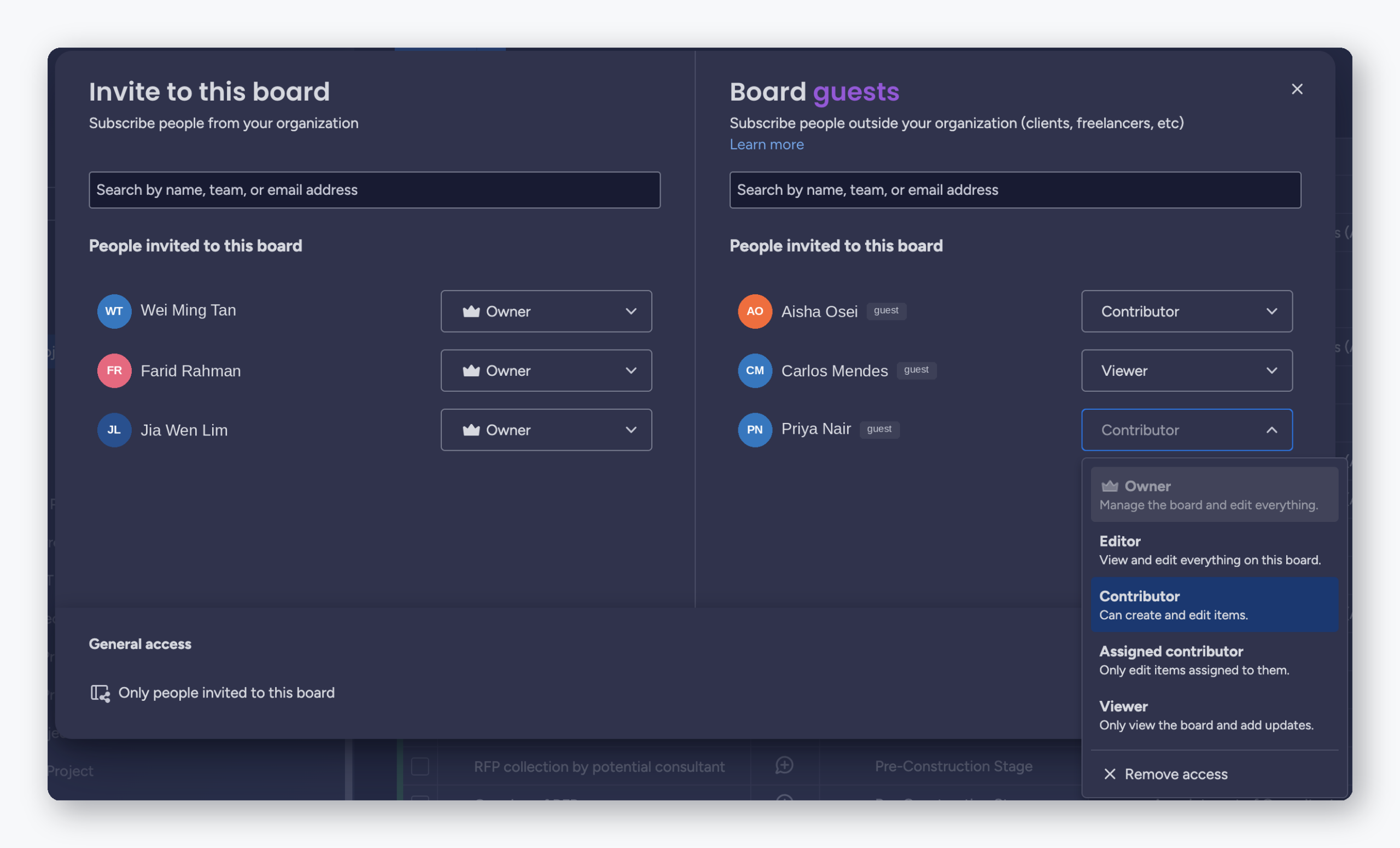
- Granular board roles — Owner, Editor, Viewer, Guest: Permissions match what a person actually needs to do, not a blanket toggle.
- Multiple guest access tiers — view-only, comment-only, upload-only: External contractors, consultants and clients get exactly the access their role requires — no more, no less.
- Approval authority restricted to named internal roles: Status changes that matter, like “Approved,” stay with the people accountable for them, not anyone with edit access.
- Private workspaces: Sensitive financial and commercial data stays internal, even while external partners work alongside your team on the same platform.
Security and Oversight That Scale Across Locations
- Enforced Single Sign-On, IP restrictions, and session controls: Replaces basic two-factor authentication with controls suited to organizations spanning multiple offices, subsidiaries, or countries.
- A Content Directory: Gives administrators one place to audit exactly who can access what, account-wide, instead of piecing that picture together manually.
- A full admin console: Adds delegated, granular control, so access management doesn’t rest solely on a single account owner.
- Automatic on/off-boarding for staff and external collaborators: Removes the manual cleanup that’s easy to miss as staff and external partner rosters change.
Document Governance That Holds Up Under Audit
Full version history and an audit trail — rather than basic file history — mean every uploaded document keeps its history, and no revision quietly overwrites another. An automated workflow can move a document through Draft → Issued for Review → Approved → Superseded, with only one version ever flagged as “current.” Every approval is time-stamped, giving organizations a defensible, ready-made record for clients, auditors, or regulators, without extra manual documentation work.
Consider a technical drawing that goes through several revisions during a project. External drafters can upload and comment, but only internal engineers can approve. When a new revision is approved, the platform automatically marks the earlier one as superseded, so field teams never build from the wrong version.
Why the Premium Is Worth It
Enterprise-level access controls aren’t a compliance checkbox. They prevent specific, costly mistakes: the wrong document version being used, an unauthorized approval, or a partner seeing information they shouldn’t. For organizations running multiple concurrent projects with outside collaborators, the incremental cost of these features is small compared to the cost of even one governance failure — a missed approval, a document mix-up, or an avoidable access exposure.
And as more departments, projects and external partners join the platform, granular, centrally managed permissions scale cleanly, where all-or-nothing access does not.
The Bottom Line
If your organization coordinates internal teams and external partners on shared projects, access control isn’t a “nice to have.” It’s the feature that decides whether that collaboration is safe at scale. See how monday.com Enterprise’s authorization and governance capabilities fit your organization’s structure.
Ready to See It on Your Own Boards? Look No Further Than equalOne
For businesses of all sizes, equalOne stands as a trusted monday.com partner, offering a range of monday.com services tailored to unique needs. With a team of experienced consultants and experts, equalOne can help you configure the granular permissions, guest tiers and document governance that keep multi-team projects safe at scale. Contact us today to request a monday.com Enterprise walkthrough.