
Engineering Change Control is one of the most common — and most easily mismanaged — processes on a complex project. A technical query, a site condition or a client request triggers a change, and from there the request, the assessment, the approvals and the revised drawings can scatter across emails, spreadsheets and disconnected tools. In this article, we look at why engineering change control becomes difficult at scale, and how monday.com turns the process into a single, connected, traceable workflow — from initiation through final release.
Why Engineering Change Control Becomes Difficult
Engineering changes can quickly become difficult when requests, approvals, revisions and communications are scattered across disconnected tools. Without a controlled workflow, teams face delays, missed approvals, version confusion and limited visibility — putting project delivery, compliance and cost control at risk. Six challenges show up again and again: requests are fragmented, originating from emails, meetings, drawings, site instructions and client comments. Approvals get delayed, sitting with engineering, project, consultant or client sign-off. Revisions cause confusion when teams work from outdated drawings or documents. Visibility is limited, leaving project managers unsure which changes are open, blocked or awaiting approval. Traceability is weak, making it hard to reconstruct who requested, assessed, approved or released a change. And reporting is manual, with engineers and project teams spending hours compiling spreadsheets and status updates.
A Single Enterprise Workflow for Engineering Change Control
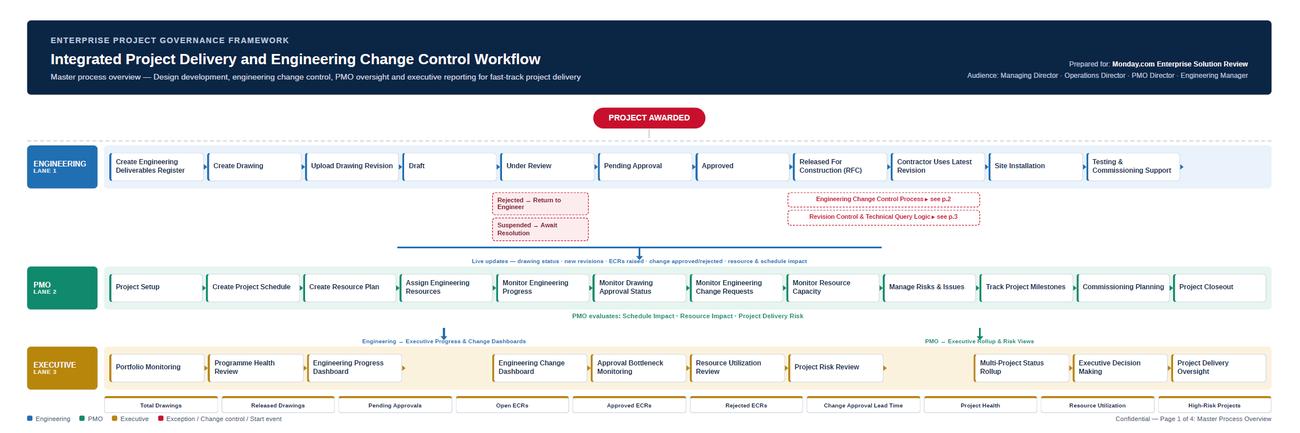
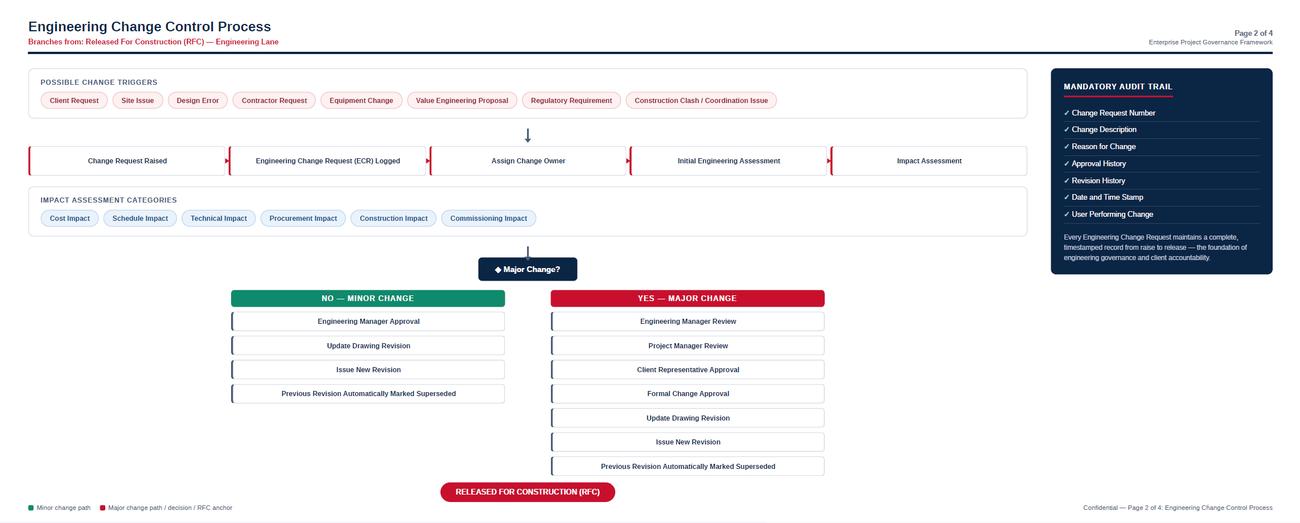
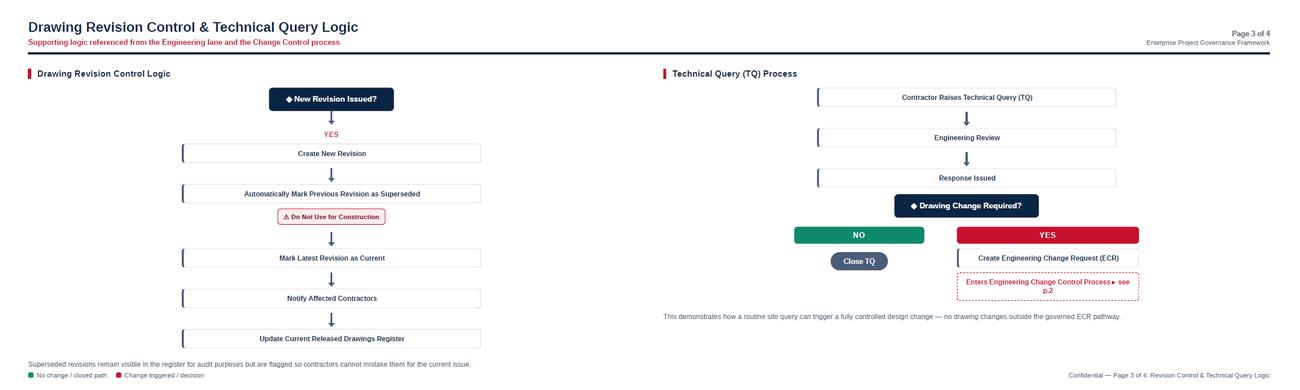
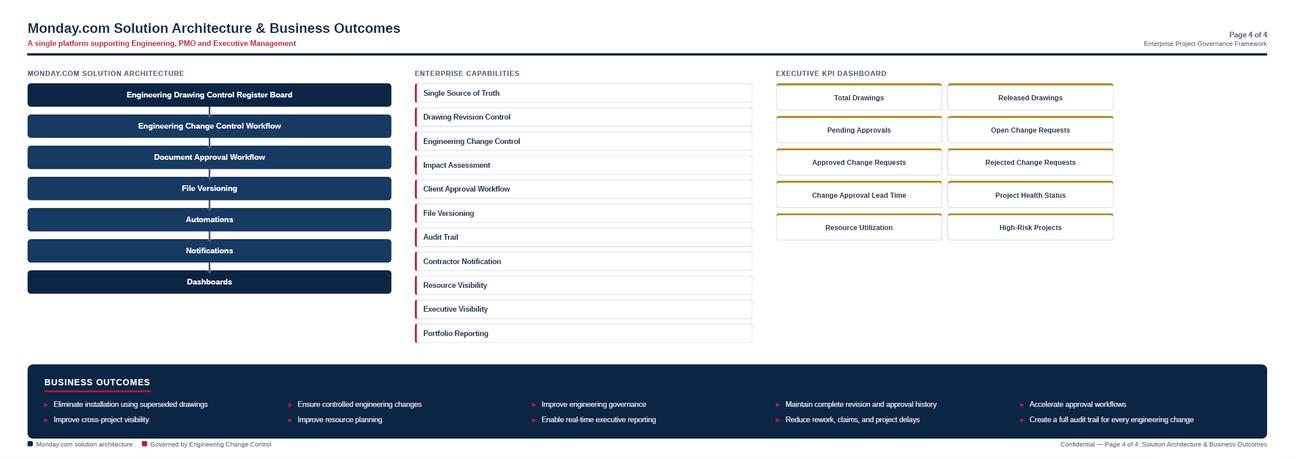
From the moment a technical issue, client request or site condition triggers a change, every action can move through a controlled digital workflow — creating accountability, traceability and visibility from initiation through final release. The end-to-end process runs across four connected layers: a master process overview spanning Engineering, PMO and Executive lanes from project award through site installation and testing; the engineering change control process itself, covering change triggers, impact assessment, the major-change decision point, and the minor and major approval branches through to release; revision control and technical query logic, showing how a new drawing revision supersedes the previous issue and how a technical query can trigger a formal Engineering Change Request; and the solution architecture, mapping the monday.com boards, capabilities and KPIs that support the process end to end.
Turn the Workflow into a Connected Digital Process
monday.com provides a flexible work management platform that can be configured to manage Engineering Change Requests, technical queries, engineering assessments, approvals, document revisions and release activities within a connected workflow. Six capabilities carry the process: a centralized change register capturing every Engineering Change Request in a structured board; automated workflow that moves items between review, approval, revision and release stages on their own; approval management that routes changes to the correct engineering, project, consultant or client stakeholders; document and revision control that associates drawings and supporting documents with the relevant change; real-time status that immediately identifies open, pending, approved, rejected or blocked changes; and executive visibility that rolls project information up into dashboards for management and PMO oversight.
From Engineering Change to Controlled Delivery: The Lifecycle
Transform engineering changes into controlled, traceable delivery. From technical query to approval, revision and release, monday.com connects people, processes and information in one automated workflow — reducing delays, improving control and accelerating project delivery. The lifecycle runs in eight steps: identify a technical query, site issue, client request or design change; register it as an Engineering Change Request; assess the engineering, commercial, schedule, document and project impact; review the change with engineering and project stakeholders; approve or reject it through authorized stakeholders; revise the affected drawings and technical documents; release the approved documentation to the project team; and monitor progress, bottlenecks and outstanding changes. Capture the change. Control the process. Accelerate delivery.
See the Process in the Platform
Here is Engineering Change Control in action — from technical queries and change requests through assessment, approval and document release to real-time executive reporting.
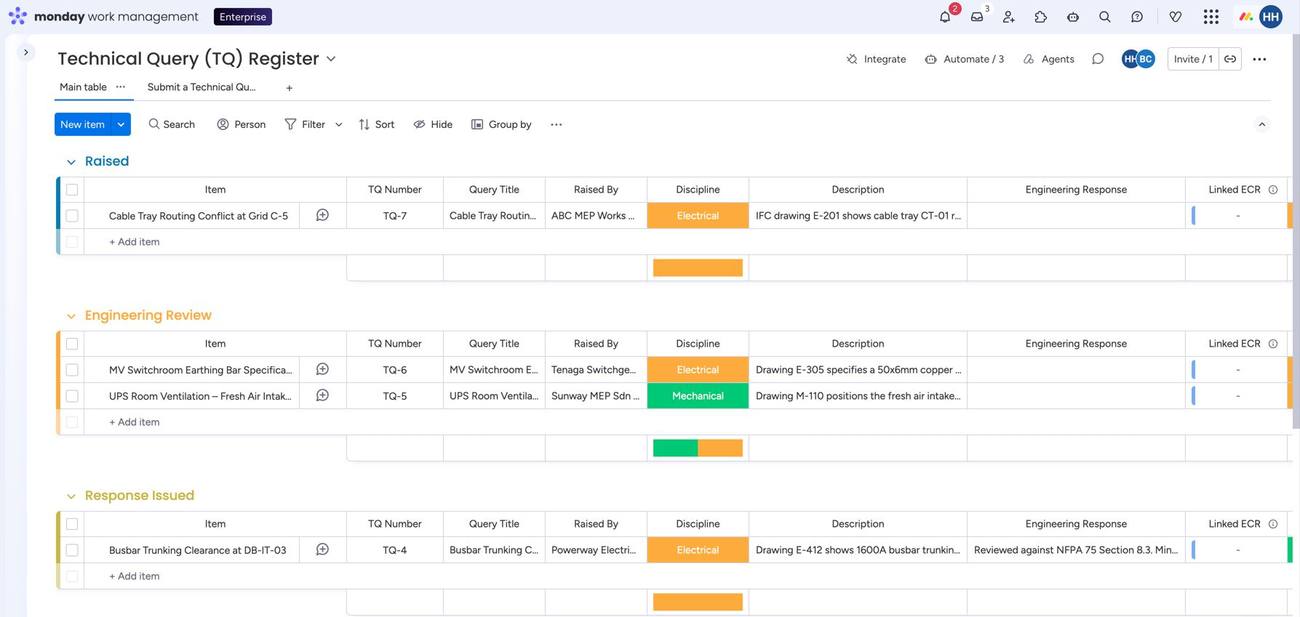
01 — Technical Query Register
Logs technical queries raised on site, tracked through Raised, Engineering Review and Response Issued, with a link to any Engineering Change Request the query generates.
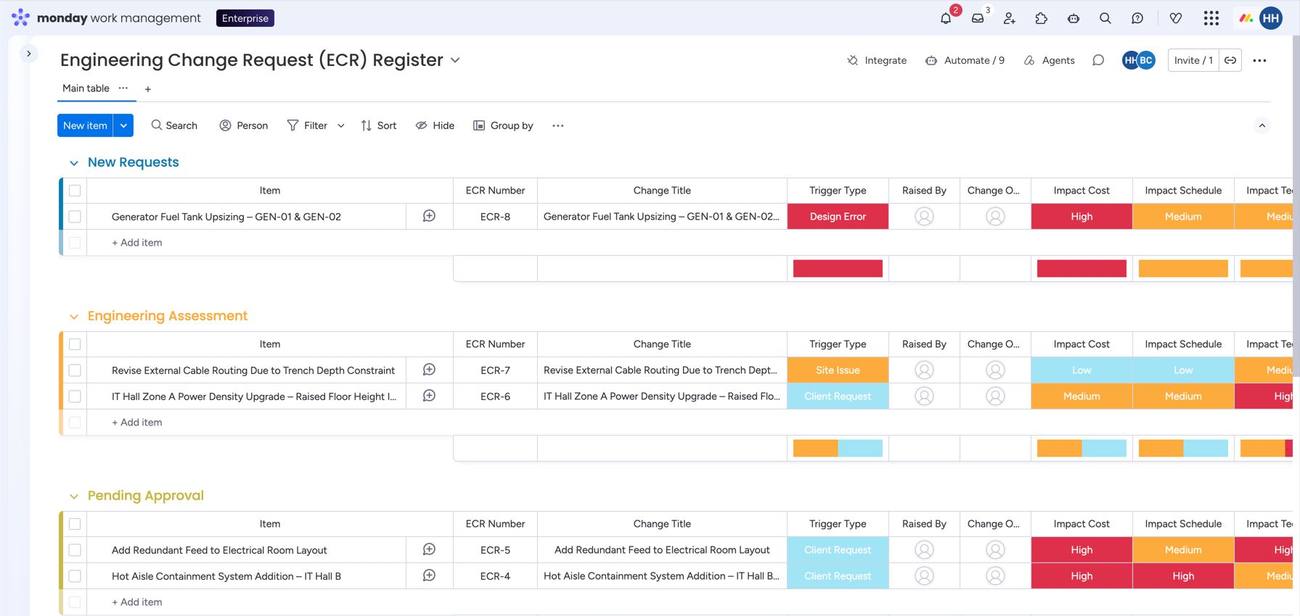
02 — Engineering Change Request Register
Every change request in one board, grouped by New Requests, Engineering Assessment and Pending Approval, with trigger type and ownership tracked centrally.
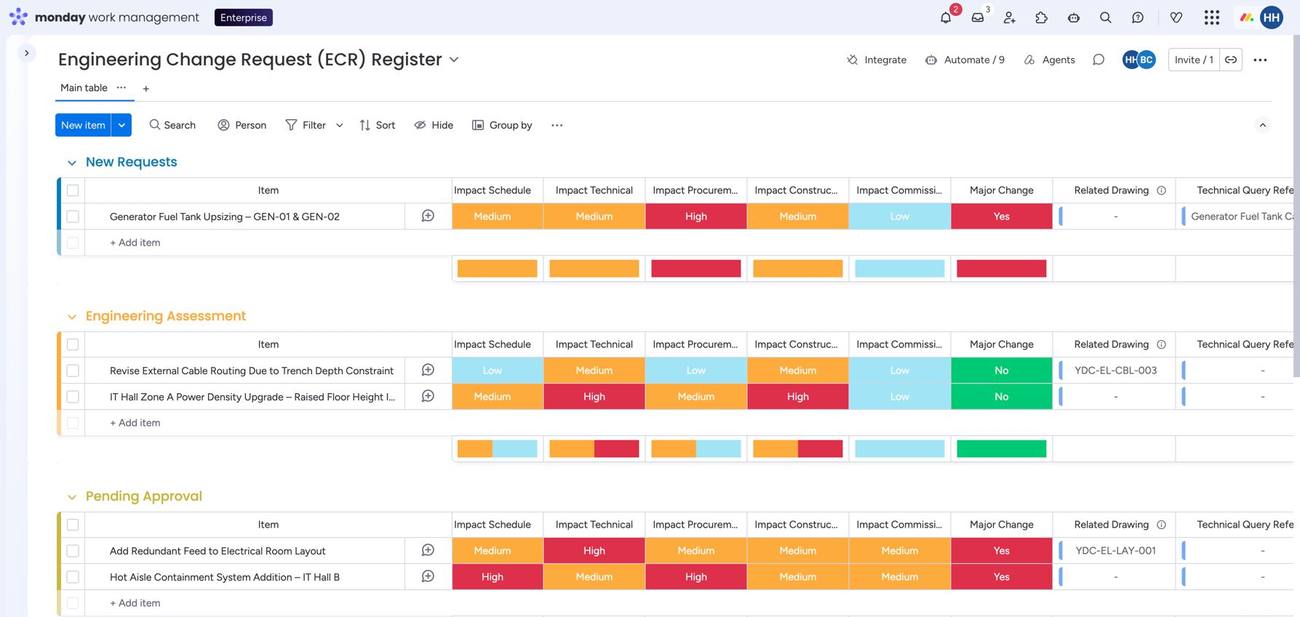
03 — Impact Assessment
Schedule, technical, procurement, construction and commissioning impact recorded per change, with an automatic major-change flag.
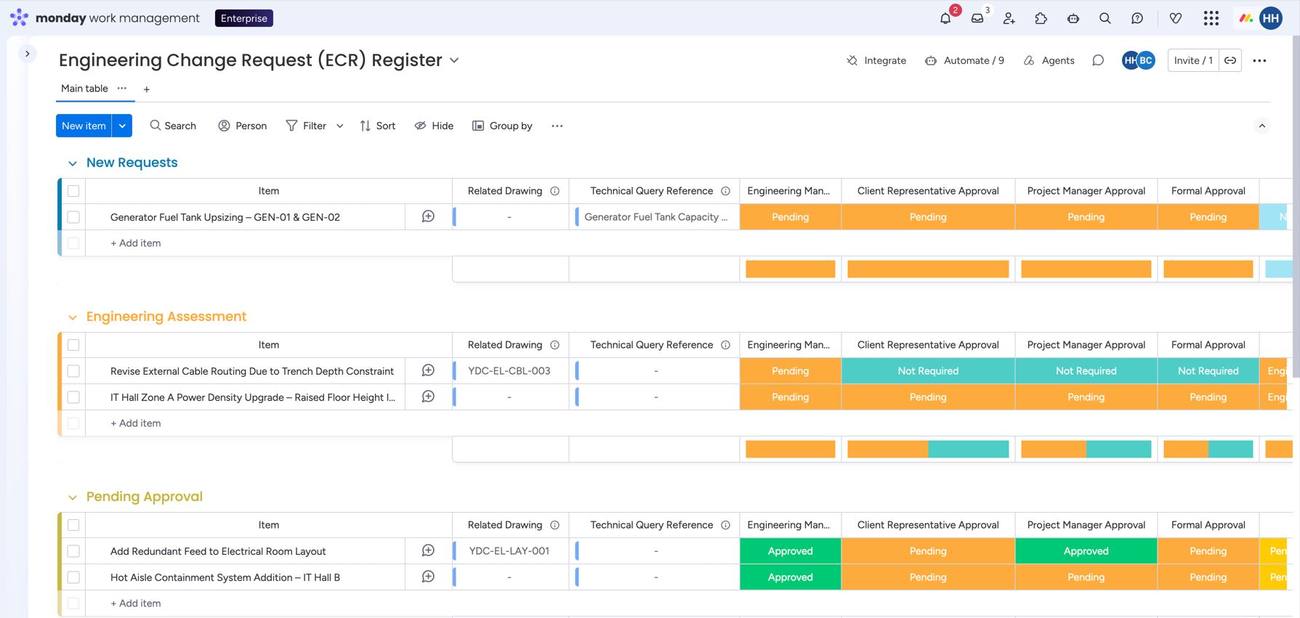
04 — Approval Workflow
Engineering Manager, Client Representative, Project Manager and Formal Approval status tracked side by side for every request.
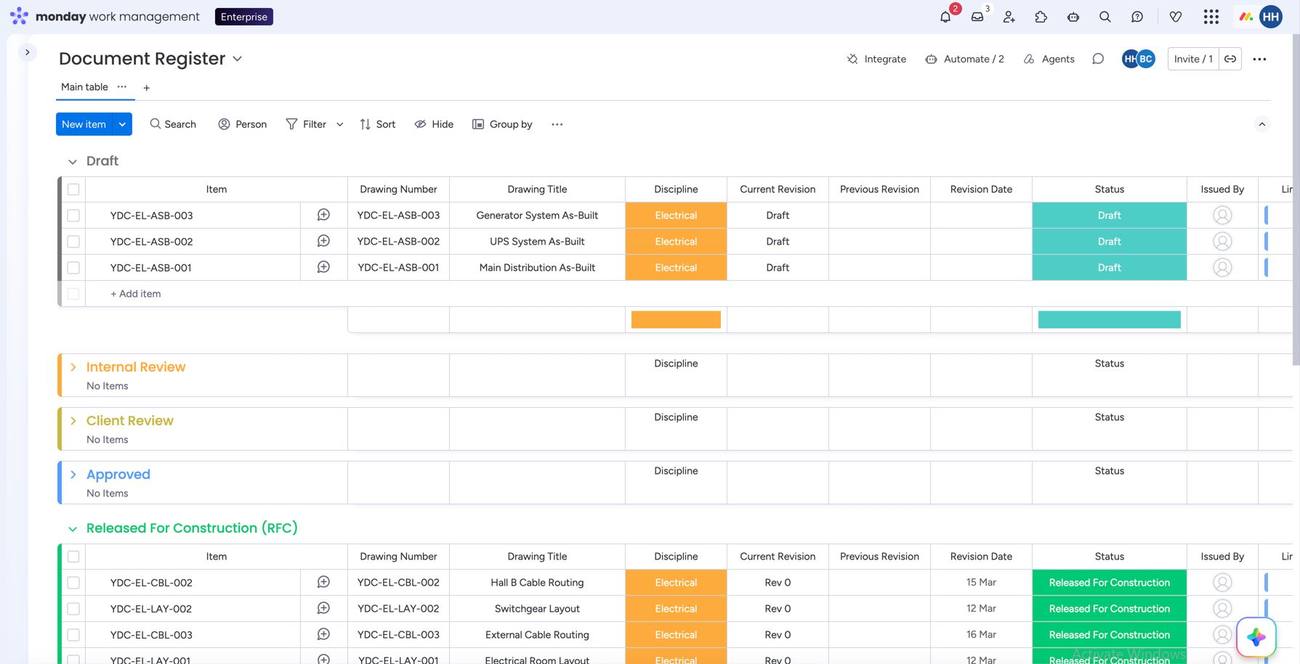
05 — Document Register
Drawings tracked through Draft, Internal Review, Client Review, Approved and Released For Construction, with revision numbers and issue dates.
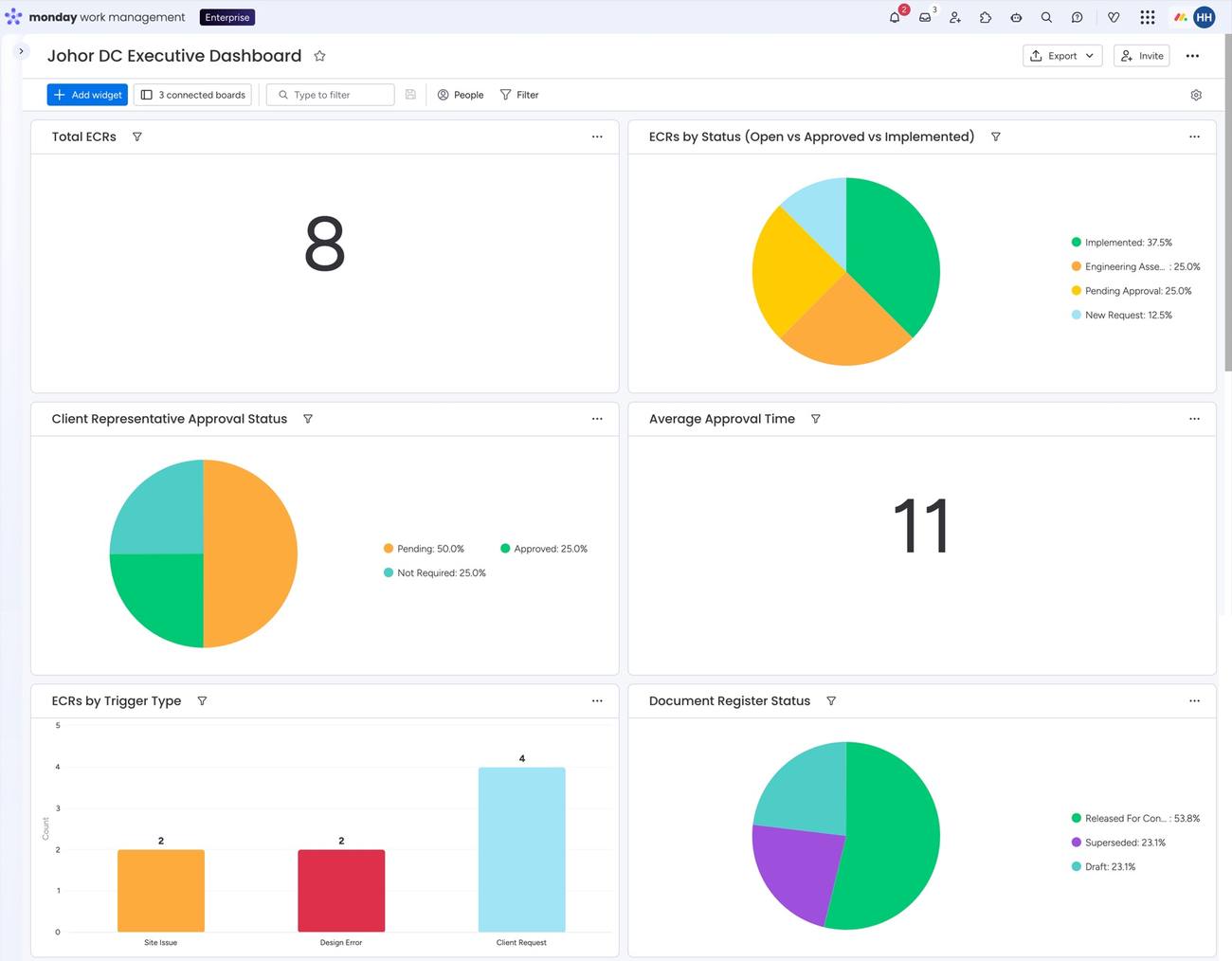
06 — Executive Dashboard
A rolled-up view of ECR status, approval status, average approval time and document register status for management — illustrative figures shown, but the same dashboard logic applies to real project data.
From Change Management to Project Control: The Business Value
Transform engineering change management into end-to-end project control. Connect requests, assessments, approvals, document revisions and delivery in one structured workflow — giving teams greater visibility, stronger governance and faster execution. The benefits compound across six areas: faster decisions, by reducing the time required to route and approve engineering changes; greater traceability, maintaining a visible record of ownership, status and approvals; better revision control, connecting engineering changes with the documents they affect; fewer communication gaps, bringing engineering, PMO, project, consultant and client stakeholders into one workflow; real-time visibility into open changes and approval bottlenecks without waiting for manual status reports; and scalable governance, standardizing Engineering Change Control across projects, departments and business units.
Designed for Complex Project Environments
This kind of workflow is built for organizations managing multiple projects, multiple engineering disciplines, and a wide network of contractors, consultants, clients and suppliers across document-heavy, fast-track project schedules. Standardize the process without slowing the project down.
A Digital Engineering Change Control Framework
The implementation concept is straightforward: an Engineering Change Request board feeds assessment and review, which feeds an approval workflow, which connects to the document and drawing register, which drives release management, which rolls up into an executive dashboard. Around this core, supporting components — automations, notifications, workload visibility, dashboards, forms, file management, approval workflows and external stakeholder collaboration — keep the whole process running without manual chasing.
Turn Engineering Change Into Controlled Delivery With equalOne
For businesses of all sizes, equalOne stands as a trusted monday.com partner, offering a range of monday.com services tailored to unique needs. With a team of experienced consultants and experts, equalOne can build a connected Engineering Change Control process that gives engineering teams the structure they need, project teams the visibility they want, and management the confidence to make faster decisions. Contact us today and experience efficiency, innovation, and growth with equalOne by your side.
Conceptual solution illustration. monday.com configuration and feature availability may vary by plan, account configuration and implementation approach. Dashboard figures shown are illustrative examples, not actual customer results.