
monday.com has grown from a popular project management tool into a full AI Work Platform (Work OS) trusted by large organizations worldwide. Its rise is no coincidence; enterprises are discovering that most of their daily friction is not in their systems of record, but in the coordination between them — the spreadsheets, email threads and status meetings that hold work together. In this article, we will go into the most common enterprise use cases of the monday.com AI Work Platform, the features behind them, and how it connects to the rest of your enterprise stack.
What is the monday.com AI Work Platform
Before we get to the use cases, let’s learn about what monday.com is first. monday.com is a cloud-based Work OS that lets teams build the workflows they need — boards, dashboards, forms and automations — without writing code. It replaces the patchwork of disconnected spreadsheets, email approvals and status meetings with one shared system that shows the work, moves it forward automatically, and keeps everyone aligned.
With the addition of AI capabilities, the platform can now also do parts of the work itself — for example, extracting vendor names, amounts and dates from uploaded invoice documents, summarizing updates, and helping teams build automations faster. Combined with enterprise-grade governance (item-level permissions, full audit logs, SOC 2 Type II and ISO 27001), this makes monday.com a serious option for enterprise departments such as Finance, Operations, Marketing and IT.
Key Features of the monday.com AI Work Platform
One Source of Truth
Every budget, request, invoice and task lives in one connected system instead of disconnected files. Mirrored and linked boards roll information up across departments and cost centers, so there is a single governed view with no version-control headaches.
Automation
Notifications, routing, assignments and status changes happen on their own. Automations can route a request to the right approver based on amount and category, escalate items when a due date passes, and alert an owner when spend crosses a threshold such as 80% of budget.
Dashboards and Real-Time Visibility
Live dashboards show variance, aging, backlog and approval SLAs as they happen, so leaders manage by exception instead of chasing status in meetings and inboxes.
Templates and Standardized Processes
The monday.com Template Center offers ready-made templates — such as Budget Tracker, Finance Requests and Bill Tracker — so every cycle runs the same, repeatable way and new teams onboard quickly.
AI Capabilities
AI can extract structured data from uploaded documents (for example, vendor, amount and dates from an invoice), summarize long update threads, and assist users in building formulas and automations — reducing manual, repetitive work.
Enterprise Governance and Security
Item-level permissions, a full activity log, and SOC 2 Type II and ISO 27001 certifications provide the audit trail and control that enterprise compliance teams require — with no IT overhead, because business teams build and adapt their own boards without developers.
Key Enterprise Use Cases of monday.com
Enterprise Finance is a great illustration of how the AI Work Platform is used at scale, because Finance is a cross-functional hub: every budget, approval, invoice and close cycle depends on hand-offs from other teams and systems. Here are the three most common use cases in large organizations.
Use Case 1: Budget Planning and Budget Tracking
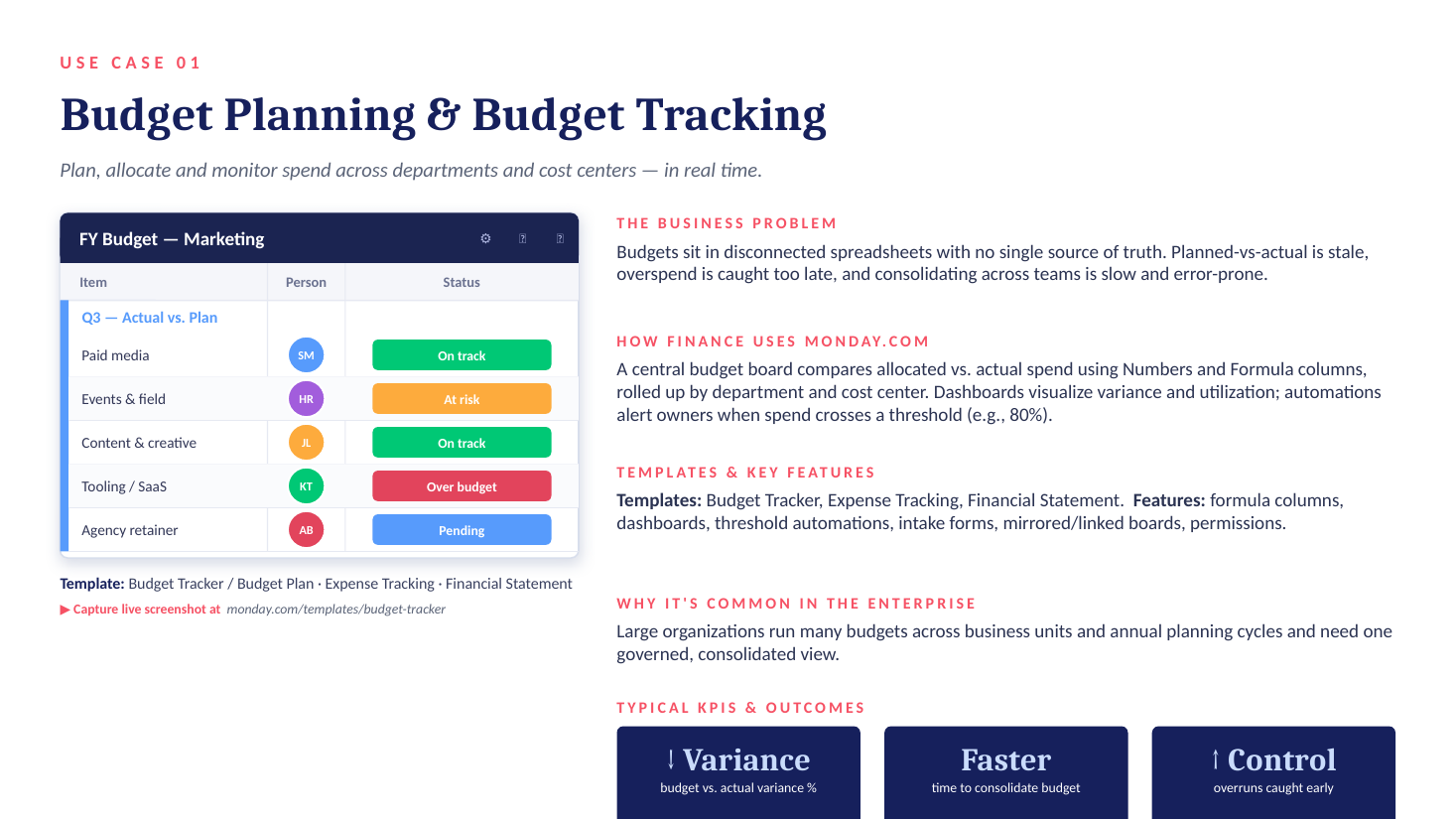
Budgets often sit in disconnected spreadsheets with no single source of truth. Planned-versus-actual data is stale, overspend is caught too late, and consolidating across teams is slow and error-prone.
With monday.com, a central budget board compares allocated versus actual spend using Numbers and Formula columns, rolled up by department and cost center. Dashboards visualize variance and utilization, and automations alert owners the moment spend crosses a defined threshold. Enterprises typically see lower budget variance, faster consolidation, and overruns caught early. Relevant templates include Budget Tracker, Expense Tracking and Financial Statement.
Use Case 2: Financial Request and Approval Workflow
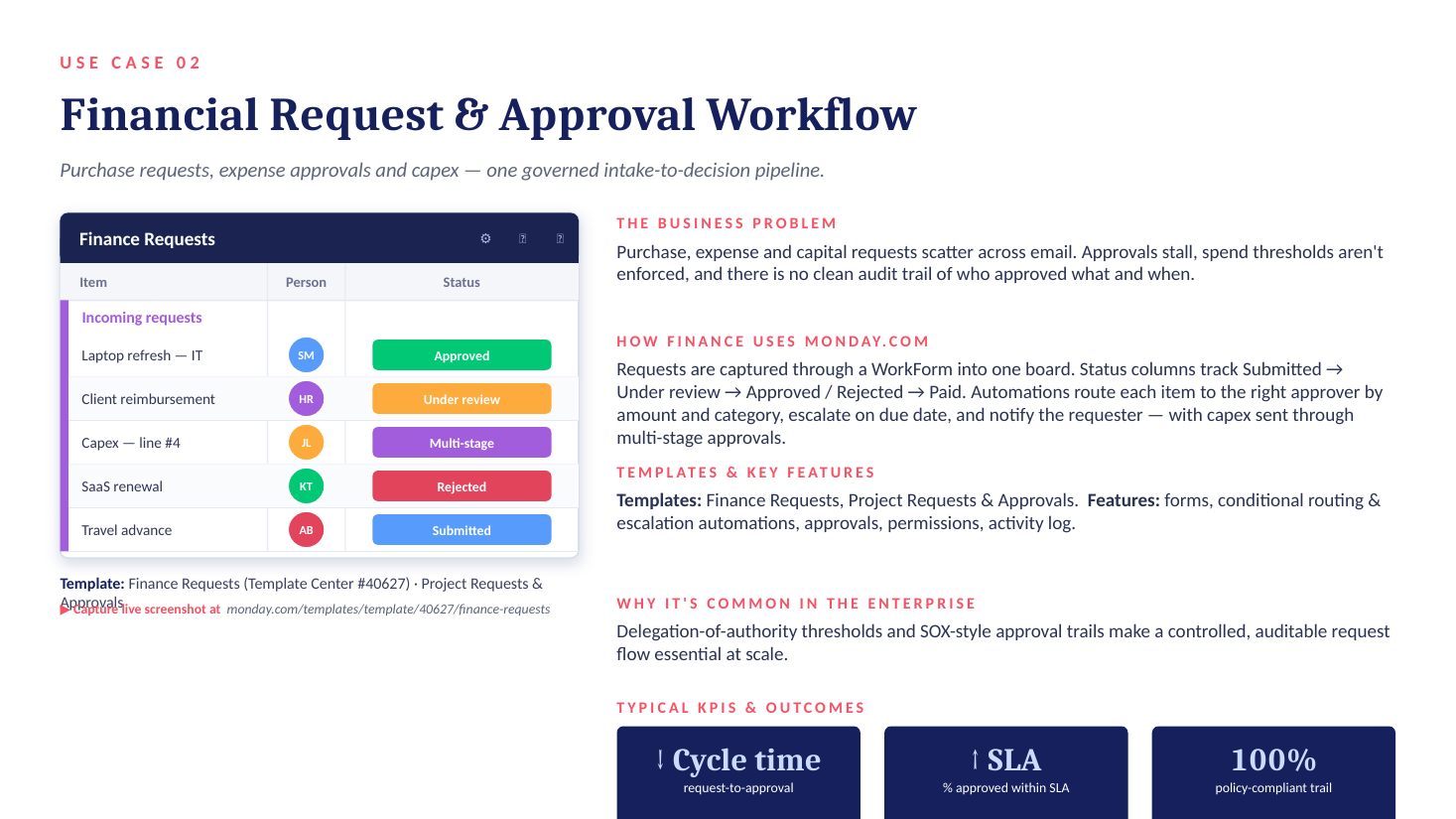
Purchase, expense and capital requests tend to scatter across email. Approvals stall, spend thresholds are not enforced, and there is no clean audit trail of who approved what and when.
On monday.com, requests are captured through a WorkForm into one board and tracked through a status pipeline: Submitted → Under review → Approved / Rejected → Paid. Automations route each item to the right approver by amount and category, escalate on due dates, and notify the requester — with capex flowing through multi-stage approvals. This matters at enterprise scale because delegation-of-authority thresholds and SOX-style approval trails demand a controlled, auditable request flow. Typical outcomes are shorter request-to-approval cycle time, more approvals within SLA, and a fully policy-compliant audit trail. Relevant templates include Finance Requests and Project Requests & Approvals.
Use Case 3: Accounts Payable and Invoice Tracking
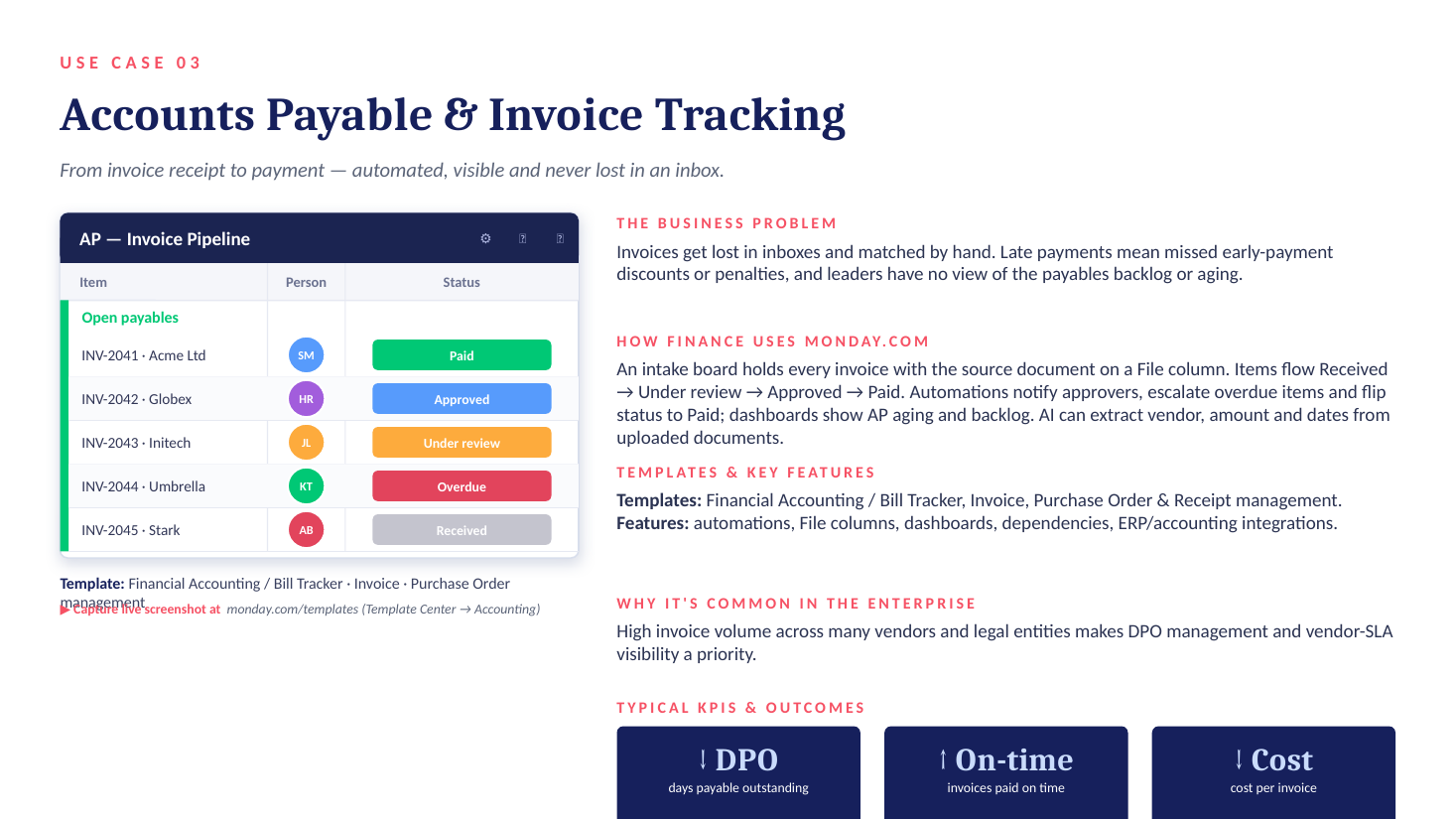
Invoices get lost in inboxes and matched by hand. Late payments mean missed early-payment discounts or penalties, and leaders have no view of the payables backlog or aging.
With monday.com, an intake board holds every invoice with the source document attached to a File column. Items flow Received → Under review → Approved → Paid. Automations notify approvers, escalate overdue items and flip status to Paid, while dashboards show AP aging and backlog. AI can extract the vendor, amount and dates from uploaded documents automatically. The result: lower days payable outstanding (DPO), more invoices paid on time, and lower cost per invoice. Relevant templates include Financial Accounting / Bill Tracker, Invoice, and Purchase Order management.
Connecting monday.com to the Enterprise Stack
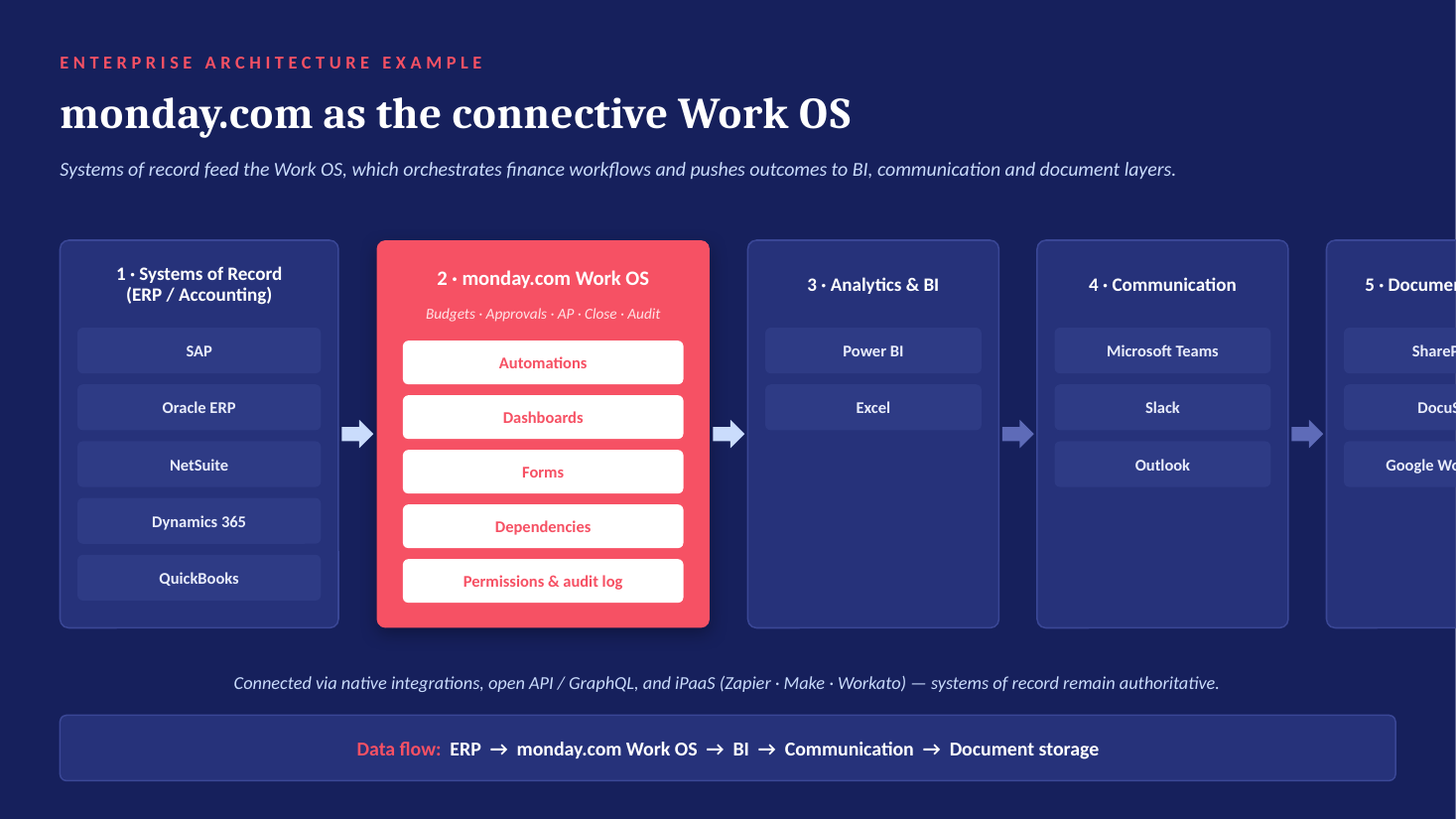
A key reason these use cases work at enterprise scale is that monday.com orchestrates the work while your systems of record stay authoritative. It connects natively, via the open API / GraphQL, or through iPaaS connectors such as Zapier, Make and Workato.
ERP and Accounting
SAP, Oracle ERP, NetSuite, Microsoft Dynamics 365 and QuickBooks integrations sync financial and master data into operational workflows — for example, two-way project-to-finance sync with NetSuite that can trigger invoices and journal entries and speed up month-end close.
CRM, BI and Data
Salesforce syncs accounts and opportunities for revenue visibility, Excel offers two-way import/export for familiar modeling, and Power BI pushes board data into enterprise BI dashboards.
Communication and Documents
Outlook, Microsoft Teams and Slack keep people notified and let approvals happen directly in channels, while SharePoint manages source documents at scale and DocuSign closes the approval loop with e-signature. Google Workspace is supported as well.
The business value is consistent across all of these: one source of truth, no manual re-keying (and fewer errors), and real-time visibility — while ERP and accounting systems remain the authoritative books.
How to Get Started
Based on what works in large organizations, we recommend a simple sequence. Start where friction is highest — approvals and accounts payable deliver the fastest, most visible ROI. Integrate ERP and BI early, so monday.com reflects the books rather than a disconnected copy. Roll out on templates plus Enterprise permissions to scale consistently and safely. And measure the KPIs — approval cycle time, DPO and budget variance — from day one.
Ready to Put the monday.com AI Work Platform to Work? Look No Further Than equalOne
For businesses of all sizes, equalOne stands as a trusted monday.com partner, offering a range of monday.com services tailored to unique needs. With a team of experienced consultants and experts, equalOne ensures seamless monday.com implementation, workflow design, integration and ongoing support. Contact us today and experience efficiency, innovation, and growth with equalOne by your side.